
Rollup Picklists to Master Object [no Apex required]

Posted November 10th, 2009 in Tips & Tricks by John Coppedge

How can you translate text from a related list into a field on your master object?

image

Magic.  Pure and simple.  That, and formulas.  Lots of formulas.  We’ll call it Formula Magic.

This works by assigning each entry within the picklist to a range of digits, using a roll-up summary formula to compile the totals, and then using remainder calculations to determine type.

Here’s how to set it up:

Continue Reading »

Share on TwitterShare via email

Perform an Update Using an External ID [Upsert without the Insert]

Posted November 6th, 2009 in Tips & Tricks by John Coppedge

The ‘update’ function within the data loader does not allow you to specify an external ID.  Well, as it turns out I needed to do just that.

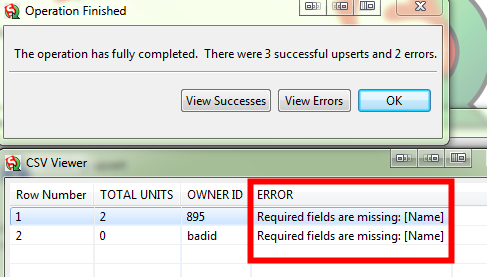
The simple work-around is to simply not include a required field and then perform an upsert.

In my example, I was updating accounts via the external ID “OWNER ID”.  By leaving out the “Name” field (required to create a new account record), I will get an error message instead of creating new accounts:
image

You could set a different field to required (checkbox on the field itself, not the page layout) in order to get the same functionality with the name field included.  As always- if you are playing with data in a production org, test with a small batch before you load up the big guns!

Share on TwitterShare via email

WordPress.com to WordPress.org [Migration]

Posted October 7th, 2009 in Site Updates by John Coppedge

I haven’t been posting as frequently lately, and with good reason:  I’ve been busy.  Work has picked up with new projects (including some interesting SF.com work), I’ve had a ton of stuff going on in the offline world, and I’ve been studying.  I’ve been preparing for the developer, consultant, and advanced administrator exams.  Stay tuned, you can expect some materials in the not too distant future.

Migrating from WordPress.com to a self-hosted solution was surprisingly easy.  I purchased the domain previously through a provider, the process is likely more complicated if you purchased a domain directly through WordPress.

  1. Add a hosting package to your domain (usually 5-10$/mo).
  2. Export your WordPress.com blog.
  3. Change nameservers on the domain to your web host.
  4. Install WordPress on your web host.
  5. Import the file created in step #2 into your newly hosted blog.

I set up a hosts file entry on my local pc so that I could access and configure the site completely before the nameserver changes made the site live to the rest of the world.

That’s it for now!  Cheers,

John

[one quick edit: make sure to edit your permalinks after you install WordPress to match the style used on WordPress.com]

Share on TwitterShare via email

Associate One Gmail Account with Infinite Salesforce Usernames [Tips & Tricks]

Posted October 7th, 2009 in Tips & Tricks by John Coppedge

Just by adding +identifier before the @ symbol on any Gmail or Google Apps email account, you can use an infinite number of email addresses that all drop into the same account.

e.g.

first.last@gmail.com

first.last+org1@gmail.com

first.last+org2@gmail.com

All of these messages will drop into first.last@gmail.com.  You can apply filters via the identifier.

While I absolutely LOVE LastPass for my password management, I must admit that I’ve got a ton of accounts spread out over several domains, and it is quite a pain to manage.  I wish I had known about this two years ago!


Thanks Jeff Douglas for the great tip!

Share on TwitterShare via email

Google Apps and Salesforce Web Integration Review [Not ready for primetime?]

Posted September 30th, 2009 in 3rd Party Integration, Google Apps by John Coppedge


I spent some time recently playing with the Google Apps and Salesforce integration.  This product overview will get you a pretty good idea of how it works.  However, the demo leaves out a few critical shortcomings:

Continue Reading »

Share on TwitterShare via email