Salesforce Ideas Breakdown

Posted December 1st, 2009 in Certified Advanced Administrator, Certified Consultant by John Coppedge

It’s Not About Technology, It’s About Ideas

image The Ideas platform provides a method to collect feedback from end users, consumers, and other influencers of a product or service.  The goal of ideas is to create a collaboration platform to prioritize requests and highlight delivery of past requests.

Examples of this platform in action:
http://ideas.salesforce.com
http://www.mystarbucksidea.com/

You could use this platform in any number of ways; here are a few examples:

  • A suggestion box for your company
  • Prioritize software feature requests from your end users
  • Use customer/partner portals to collect and prioritize product feedback from outside of your company

Continue Reading »

Developer Exam Notes Posted

Posted December 1st, 2009 in Certified Developer by John Coppedge

I passed the developer exam a little over a month ago, and have finally gotten around to posting my notes.  These notes can serve as a great supplement to the 401 podcast.  The exam itself is pretty straightforward, more situation-based than the admin exam, and there is definitely overlapping subject matter between the two.  Good luck!  Drop me a line with any thoughts/comments.

Salesforce.com Content Breakdown

Posted November 30th, 2009 in Certified Advanced Administrator, Certified Consultant by John Coppedge


Here is a great introduction video to Content.  From here, I want to focus on how to administer Content and address challenges you’ll face in your implementation.


Content is split between a number of different moving pieces:

Continue Reading »

Rollup Picklists to Master Object [no Apex required]

Posted November 10th, 2009 in Tips & Tricks by John Coppedge

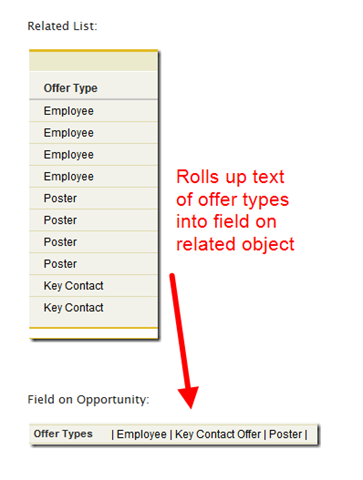
How can you translate text from a related list into a field on your master object?

image

Magic.  Pure and simple.  That, and formulas.  Lots of formulas.  We’ll call it Formula Magic.

This works by assigning each entry within the picklist to a range of digits, using a roll-up summary formula to compile the totals, and then using remainder calculations to determine type.

Here’s how to set it up:

Continue Reading »

Perform an Update Using an External ID [Upsert without the Insert]

Posted November 6th, 2009 in Tips & Tricks by John Coppedge

The ‘update’ function within the data loader does not allow you to specify an external ID.  Well, as it turns out I needed to do just that.

The simple work-around is to simply not include a required field and then perform an upsert.

In my example, I was updating accounts via the external ID “OWNER ID”.  By leaving out the “Name” field (required to create a new account record), I will get an error message instead of creating new accounts:

image

You could set a different field to required (checkbox on the field itself, not the page layout) in order to get the same functionality with the name field included.  As always- if you are playing with data in a production org, test with a small batch before you load up the big guns!